The Engineering of Great Error Messages
The Engineering of Great Error Messages
Why Diagnostics Deserve the Same Rigor as APIs and UIs
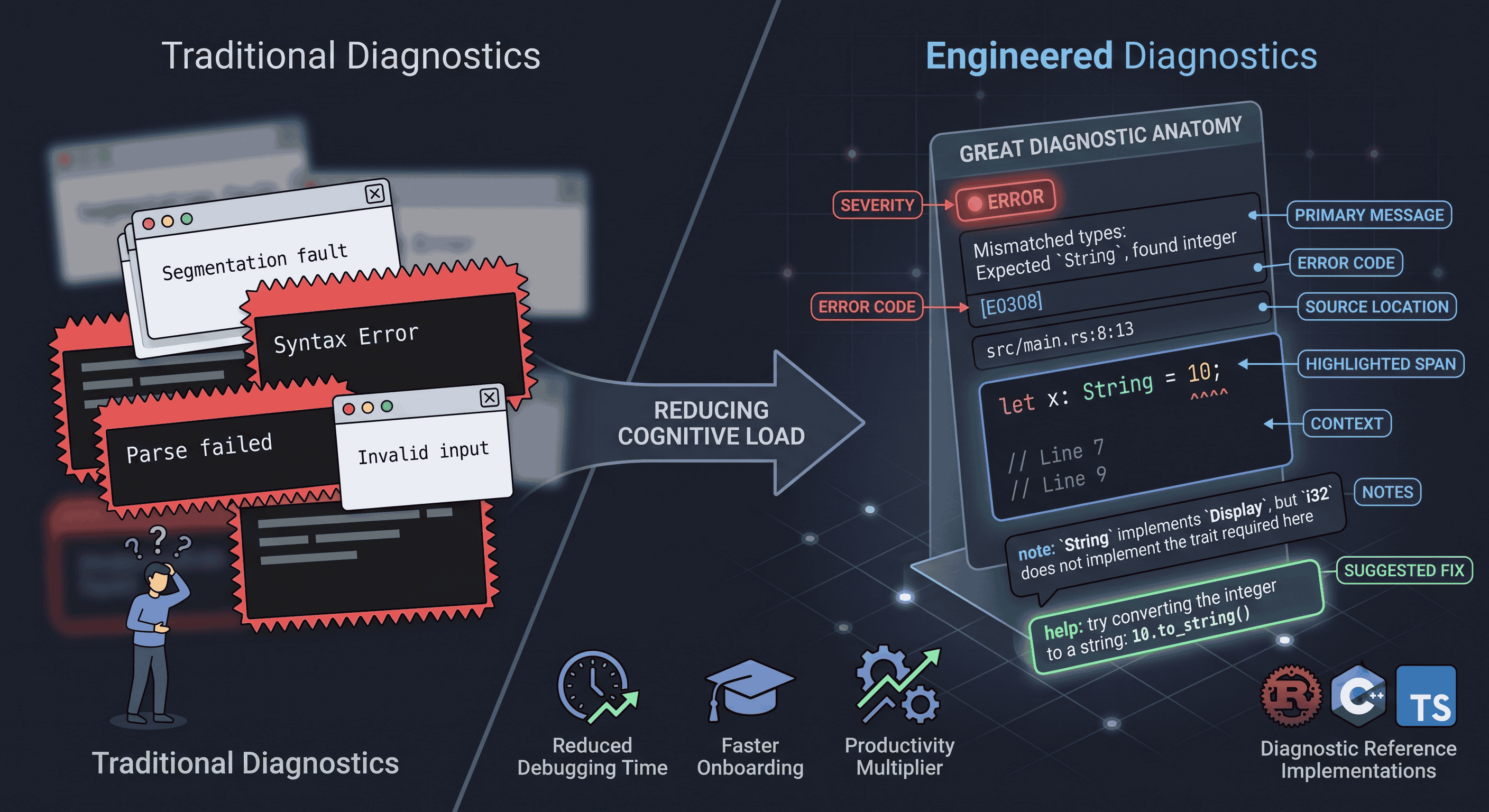
Most engineers spend years learning how to design good APIs, clean data models, and intuitive interfaces. Very few spend any deliberate time learning how to design a good error message.
And yet, for most developers, the error message is the single most frequently encountered “interface” in their entire day. It shows up more often than the documentation, more often than the onboarding guide, and often more often than the actual feature they are trying to build.
This article is about treating error messages as a real engineering discipline - not an afterthought bolted onto the bottom of a function, but a structured system with its own architecture, trade-offs, and design principles. We will look at how compilers like Rust and Clang, and type systems like TypeScript, have quietly turned diagnostics into a competitive advantage, and how the same ideas apply far beyond compilers - to CLIs, linters, configuration systems, and API validation layers.
1. Introduction: What an Error Message Actually Communicates
Every developer has seen an error like this:
Segmentation faultor this:
Syntax ErrorBoth are technically true. Both are almost useless.
They describe what happened, but say nothing about why it happened or how to fix it. The developer is left to reconstruct the missing context themselves - often by re-reading the same ten lines of code over and over, or by pasting the message into a search engine.
Now compare that to a diagnostic from the Rust compiler:
error[E0308]: mismatched types
 --> src/main.rs:8:13
  |
8 |     let x: String = 10;
  |             ^^^^^ expected `String`, found integer
In four lines, this message tells you:
- What is wrong (a type mismatch)
- Where it is wrong (file, line, column)
- Which part of the line is wrong (the caret span under
10) - What was expected versus what was found
This is not an accident. It is the result of deliberate engineering investment into the idea that:
Great error messages reduce cognitive load rather than increase it.
That single sentence is the thesis of this entire article. Everything below is really just an elaboration of what it takes to build a system that lives up to it.
2. Why Error Messages Matter More Than We Admit
It’s easy to treat diagnostics as a minor detail compared to “real” engineering work like architecture or performance. But the cost of poor error messages shows up in almost every part of the software lifecycle:
- Lost productivity - developers stop writing code and start playing detective.
- Debugging time - a vague message can turn a two-minute fix into a two-hour investigation.
- Onboarding friction - new team members hit unfamiliar errors constantly; unclear messages compound their unfamiliarity with the codebase.
- Developer frustration - repeated exposure to cryptic failures erodes trust in a tool, even if the underlying logic is sound.
- Support costs - every vague error is a potential support ticket, Slack message, or GitHub issue.
- Learning curve - for students and juniors, error messages are often the primary way they learn how a language or system actually behaves.
Studies on developer productivity consistently point to the same uncomfortable truth: a large fraction of a developer’s day is not spent writing new code - it is spent diagnosing why existing code doesn’t work. Every improvement to that diagnostic loop compounds across thousands of developers and millions of error events. A five-second reduction in “time to understand a failure,” multiplied across an entire engineering organization, is not a cosmetic improvement - it is a productivity multiplier.
3. Anatomy of a Great Diagnostic
If we strip a good error message down to its component parts, a consistent structure emerges across almost every well-regarded tool:
Diagnostic
├── Severity
├── Message
├── Error Code
├── Source Location
├── Highlighted Span
├── Context
├── Notes
└── Suggested Fix
Let’s walk through each piece individually, because each one is solving a distinct problem.
Severity
Not every diagnostic represents the same level of urgency. Most mature systems distinguish between:
- Error - something that prevents success and must be fixed
- Warning - something risky, but not fatal
- Note - supplementary information attached to another diagnostic
- Help - an actionable suggestion
- Info - general contextual information
Severity levels let a tool communicate proportionally. A wall of red “errors” for things that are actually just stylistic warnings trains developers to ignore all diagnostics equally - which is worse than having no diagnostics at all.
Primary Message
The message should explain what happened, not just that something failed.
Compare:
“Something failed”
with:
“Expected a string, but found an integer”
The second version gives the reader an actual foothold. It answers the question “failed at what, exactly?” without requiring them to open a debugger.
Source Location
src/parser.rs:42:18This looks trivial, but exact positioning - file, line, and column - is what allows tools (editors, IDEs, CI systems) to jump the developer directly to the offending code. Vague location reporting (“somewhere in parser.rs”) forces a manual search that a machine could have done instantly.
Source Span
Instead of just pointing at a line number, a good diagnostic shows the exact span of characters responsible for the failure:
let x: String = 10;
        ^^^^^
This distinction matters more than it first appears. A line can be 120 characters long and contain five different sub-expressions. Highlighting the exact span narrows the search space from “somewhere on this line” to “this one token.”
Context
Displaying two or three lines of surrounding code (rather than just the failing line) gives the reader enough context to understand why the expected type or value was what it was, without forcing them to reopen the file separately.
Notes
Notes carry supplementary explanation that doesn’t belong in the primary message, for example:
note: `String` implements `Display`, but `i32` does not implement
      the trait required here
Notes are where a tool can teach - explaining why a rule exists, not just that it was violated.
Suggestions
This is arguably the most valuable component of the entire diagnostic, and the one most tools skip entirely:
help: try converting the integer to a string

10.to_string()
A suggestion transforms a diagnostic from a description of a problem into a proposed solution. Some tools go a step further and make these suggestions machine-applicable - meaning an editor or CLI can apply the fix automatically with a single keystroke.
4. How Modern Compilers Think About Diagnostics
The biggest architectural shift in modern diagnostic systems is this: compilers stopped generating strings, and started generating structured data.
Instead of directly printing text, a modern compiler constructs an object like:
Diagnostic {
    severity,
    code,
    message,
    labels,
    notes,
    suggestions,
}
Only at the very last step is this structured object rendered into human-readable text - or, alternatively, into JSON for an IDE, or into a machine-readable format for an automated code-fixer.
This separation matters for a few reasons:
- Multiple output targets - the same diagnostic can be rendered as a terminal message, an IDE squiggly underline, or a structured JSON payload for tooling, without duplicating logic.
- Consistency - because every diagnostic goes through the same rendering pipeline, formatting stays uniform across the entire tool.
- Extensibility - new fields (like a “fix confidence score” or a “documentation link”) can be added without redesigning how every individual error is authored.
- Internationalization - structured diagnostics can be translated into different languages without rewriting the underlying error-detection logic.
This is the same principle behind separating a data model from its view layer in application development - and it turns out compilers benefit from it just as much as web applications do.
5. Comparing Popular Languages
Different ecosystems have invested in diagnostics to very different degrees. A rough comparison:
| Language | Highlights | Suggestions | Notes | Error Codes |
|---|---|---|---|---|
| Rust | Yes | Yes | Yes | Yes |
| Clang | Yes | Yes | Yes | Limited |
| TypeScript | Yes | Some | Some | Yes |
| Python | Improving | Limited | No | No |
| Java | Limited | Rare | Rare | Rare |
Rust is frequently held up as the reference implementation for diagnostic design - not because its type system is unusually complex, but because the compiler team treated diagnostics as a product surface in their own right, with dedicated design reviews and long-running RFCs.
Clang did something similar in the C/C++ world, replacing GCC’s traditionally terse output with colorized, span-highlighted, note-annotated diagnostics - a change that was, at the time, considered a genuine selling point for switching compilers.
TypeScript sits in an interesting middle ground: its editor-integrated diagnostics (through the Language Server Protocol) are excellent, but its command-line output is comparatively plain, showing that where a diagnostic is rendered can matter as much as its content.
Python and Java, historically, leaned on stack traces as the default diagnostic surface - informative to an experienced engineer, but often overwhelming to a newcomer. Recent Python releases have begun closing this gap, adding better span highlighting and “did you mean” suggestions.
6. The Engineering Behind Pretty Errors
Good diagnostics rely on infrastructure that is mostly invisible to the end user.
Source Maps
Before a tool can say “this error occurred at line 42, column 18,” it needs a way to translate an internal representation (a token index, an AST node, a compiled instruction) back into a position in the original source text. This translation layer - conceptually similar to source maps in JavaScript tooling - is what makes precise location reporting possible in the first place.
Spans
Modern diagnostic engines represent positions as ranges, not single points:
12..18rather than just:
line 5A span-based representation is what allows a tool to underline exactly 10 instead of vaguely gesturing at “the line with the problem.”
Labels
A single diagnostic can carry multiple labeled spans, each pointing at a different, related location:
expected `String`
found `integer`
with arrows connecting each label to its corresponding span. This is especially useful for errors that span multiple locations - for example, “the function was declared here, but called with the wrong argument type there.”
Rich Terminal Rendering
The final layer is presentational: ANSI colors, Unicode box-drawing characters, and caret markers:
  |
8 |     let x: String = 10;
  |             ^^^^^
It’s tempting to dismiss this as cosmetic, but readability is not a cosmetic concern - it directly determines how quickly a human brain can parse the structure of a message. A wall of monochrome text forces the reader to parse structure and content simultaneously. Visual formatting offloads structure-parsing to the eye, leaving the brain free to focus on the actual problem.
7. Designing Actionable Error Messages
The difference between a mediocre error message and a great one is rarely about vocabulary - it’s about how much work the message does on the reader’s behalf.
Bad:
Parse failedBetter:
Unexpected token ')'Great:
Unexpected ')' after expression.

Expected one of:
- identifier
- literal
- '('

Try removing the extra ')'.
Notice the progression: the “bad” version confirms only that failure occurred. The “better” version identifies the specific cause. The “great” version goes further - it enumerates what would have been valid, and proposes a concrete fix. Each step down this ladder requires the tool’s author to do more work up front, so that the end user has to do less work later.
8. Common Mistakes in Diagnostic Design
Even well-intentioned tools fall into predictable traps:
- Vague wording - “invalid input” without specifying what was invalid or why.
- Too much jargon - internal implementation terms leaking into user-facing text.
- Blaming the user - phrasing like “you provided the wrong value” instead of neutral, descriptive language.
- Missing locations - reporting that something failed without saying where.
- Dumping raw stack traces - technically complete, but rarely actionable for anyone outside the tool’s own maintainers.
- Overwhelming information - burying the one relevant detail under twenty lines of noise.
- Hiding the actual root cause - reporting a downstream symptom rather than the originating failure.
Most of these mistakes share a common root: they optimize for what was easy for the tool to produce, rather than what is useful for the human reading it.
9. Lessons from Rust
Rust’s diagnostics are so consistently praised that it’s worth isolating exactly what makes them work, without diving into compiler internals:
- Explanatory notes attached to nearly every non-trivial error, explaining the underlying rule being violated.
- Machine-applicable suggestions that an editor can apply automatically - turning the compiler into a semi-automated pair programmer.
- Stable error codes (like
E0308) that can be looked up independently viarustc --explain E0308, giving a permanent, searchable reference for each failure category. - Contextual explanations that adapt based on why a rule was triggered, rather than reusing one generic message for every violation of a rule.
- Consistency - the same visual grammar (spans, carets, labels) is used everywhere, so a developer’s mental model of “how to read an error” transfers across the entire language, not just one specific error type.
None of this required exotic technology. It required treating diagnostics as a long-term investment worth iterating on, the same way a team might iterate on a public API.
10. Applying These Ideas Beyond Compilers
None of this is exclusive to compilers. The same principles apply anywhere a tool needs to tell a human that something didn’t go as expected:
- CLIs - a misused flag should explain the correct usage, not just print a generic usage string.
- Linters - style violations benefit enormously from an explanation of why the rule exists.
- Configuration parsers - a malformed config file should point to the exact key and line, not just say “invalid config.”
- API validation - a rejected request body should specify which field failed, and why, in a format a frontend can render directly to the end user.
- Build systems - a failed build step should distinguish “your code is wrong” from “your environment is misconfigured.”
- Deployment tools - failed deployments should distinguish infrastructure failures from application failures.
- CI/CD pipelines - a red build should point directly at the failing assertion, not require the developer to scroll through a wall of log output.
- Static analyzers - flagged issues benefit from the same span-highlighting and suggestion model as compiler errors.
Once you start looking for it, “diagnostic design” turns out to be a hidden discipline running underneath almost every developer-facing tool - it’s just rarely named as such.
11. Case Study: Building Better Diagnostics
To make this concrete, consider evolving a single configuration error through several iterations.
Stage 1 - Bare minimum:
Config ErrorStage 2 - Adding a message:
Config Error: missing valueStage 3 - Adding location and span:
error[CFG001]: Missing configuration value

config.toml:12:5

database_url =
              ^ expected a string
Stage 4 - Adding an actionable fix:
error[CFG001]: Missing configuration value

config.toml:12:5

database_url =
              ^ expected a string

help:
Add a valid database URL

database_url = "postgres://..."
Each stage required incrementally more engineering effort - locating the offending key, parsing its span, and generating a contextually appropriate suggestion - but each stage also delivered a proportionally larger improvement in how quickly a developer could resolve the problem. This is the core trade-off of diagnostic engineering: it front-loads work onto the tool’s authors so that it doesn’t have to be repeated by every single user who ever hits that failure.
12. Conclusion
Error messages are one of the most frequently used interfaces in all of software development - arguably more frequently used than the documentation, the onboarding guide, or even the tool’s own README. And yet they are routinely treated as a byproduct of “real” engineering, rather than a deliberate design surface in their own right.
The core idea carries across every example in this article, from Rust’s compiler to a hypothetical configuration parser:
Great diagnostics are not about displaying failures - they are about guiding developers toward successful outcomes.
Whether you are building a compiler, a CLI, an API, or a configuration system, treating diagnostics as a first-class design concern - with structured data, precise spans, contextual notes, and actionable suggestions - can have an outsized impact on the overall developer experience. It is, in a very real sense, one of the highest-leverage investments a tool builder can make, precisely because it is paid for once by the tool’s author and collected on by every single user, every single time something goes wrong.
Suggested References
- The Error Model by Joe Duffy
- Rust compiler diagnostics documentation
- Clang diagnostics design notes
- LLVM diagnostic infrastructure
- The Pragmatic Programmer (sections on debugging)
- Rust API Guidelines (error handling)
- Research on human-computer interaction (HCI) and developer experience